
Items filtered by date: July 2015
Sync Outlook with Google Android
Most people who have android phones have windows PCs, some of those people have microsoft office and use it for their emails and calendars. Android does not have native support for syncing the calendars and emails on the phone.
When you have a samsung phone with a stock ROM it has support for syncing via the KIES software, but as soon as you install a non-stock ROM the kies software service on the phone is no longer present. This might be true for other manufacturers and their stock ROM solutions for outlook.
Contacts / Calendar / Phone Logs / SMS
I have found it frustrating syncing my Outlook contacts and calendar between outlook and my android phone. Outlook will always be my primary calendar and contacts.
I found this topic particularly difficult, i know what i wanted to do but i had loads of questions such as if i deleted the item on outlook how would it get deleted on the android phone. So i decided to work through the pain and write some instructions on how i synced my details and the different types of sync there is.
You can choose either to sync to your android phone (only/local store) or to your google account. It is important that you know about these 2 places to store contacts and calendar details. If you use the local store option gogole cannot see your contacts adn calendar events.
General Notes
- There are different ways of setting up syncing.
- Do I want to sync with google or not?
- There is a local calendar and a google calander in android phones
- When you do too many deletions of either contacts or calendar items android (possibly Google) moans about it. I experiences this in MyPhoneExplorer but might be an issue on other software syncing with a Google Account.
- Where can I force to store contacts local on the phone? I have not found an aswer to this. This come into play when you create new contacts on your phone.
- Google contacts can take some to reflect the changes from Google Servers --> Android Phone or vice versa
- Changes might be caused by Google adding extra info to contacts such as contact images
- How to Import / Export Contacts Between Outlook and Gmail - This is a manual method to import and export contacts between Outlook and your Gmail account.
Software
There are 2 programs that are capable of performing sysncing with outlook and various endpointd (to be investgated) for both contacts and calendar
MyPhoneExplorer
FJ Software Development - Home of MtPhoneExplorer
This is my preffered option and works with most android phones.
MyPhoneExplorer has the ability to sync your:
- Outlook Contacts
- Outlook Calendar
- Outlook notes
- Call Log (to MyPhoneExplorer)
- SMS Messages (to MyPhoneExplorer)
MyPhoneExplorer also has the following features:
- Sync with either your Google Account or just the android phone's local store
- Allows syncing over USB / WIFI / Bluetooth
- Automatic Syncing
- Syncing that allows you to control each sync item
- Monitor some settings of the phone such as CPU Temperature / Voltage
- Storage Usage
- Push Notifications to the windows desktop such as incoming SMS messages
- Dial the phone from you PC
- File Explorer
- And more ......
Using Default settings, the following happens
You might find the follow useful so you know what will happen with default settings and to make sure you have them set as you require before you run the MyPhoneExplorer sync for the first time. I assume you have installed the app on the android phone and the windows app as per instructions. I also used a USB for these tests.
Created a Contact in Google Contacts (webpage)
- If I create a contact on Google Contacts (webpage) it will appear on my phone after androids syncs the google account (or i manually start the sync). After this happens, i ran MyPhoneExplorer sync and the contact was synced to my Outlook contacts.
- If I then delete this contact in Outlook and run a sync with MyPhoneExplorer, it deletes the contact from Google contacts on the phone. When the my android phone syncs the Google Account with Google, the contact will be removed from from my Google Contacts
Created Calendar item in Google Calendar (webpage)
- I created the item in google calcnder (webpage) and it appeared on my phone. I then ran phonexplorer and it synced that entery to my outlook
- I deleted the entery in outlook and the entery was deleted on my phone and on google calendars webpage after a sync
Created Contact in Outlook
- If I create a contact in outlook. Myphoneexplorer will sync it to my android phone. So far it seems to only sync it to my android phone local store/contacts. This means that new contacts are created in the phones local contacts store and cannot be accessed by Google.
Created Calendar item in Outlook
- If I create an event/calendar item/appointment contact in outlook. MyPhoneExplorer will sync it to my android phone local store/calendar. This means that new contacts are created in the phones local calendar and cannot be accessed by Google.
What I would do
I am going to use my Google Account rather than the Phone's Local Store. You can always change this later but would require a bit of effort. My Outlook will always be my primary store for contacts and calendar events.
- install and configure the App on the phone:
- set new contacts to be created in your Google Account (this is set in the android app - settings / 'Add new contacts to')
- set new calendar/events to be created in Google calendars (this is set in the android app - settings / 'Add new events to')
- set your the only contacts store to be synced to your Google Account (this is set in the android app - settings / 'Contact-accounts to sync') - if you dont things can get messy
- set your Google Calendar to be the only calendar to be synced (this is set in the android app - settings / 'Contact-accounts to sync') - if you dont things can get messy
- set the address format to a UK version, set this to Street, City, Region Zip code, County (this is set in the android app - settings / 'Address Format') (optional)
- disable standby mode which kills Bluetooth connections and you have to restart the PC and phone to get things working again. Set too (Settings / Standby mode on active connection / Avoid Standby-Mode)
- set the phone app to launch automatically
- install the software on windows and:
- Configure the Sync settings (File / Settings / Sync ) to point to Outlook.
- The default settings will sync the data from the phone only with MyPhoneExplorer's internal datastore
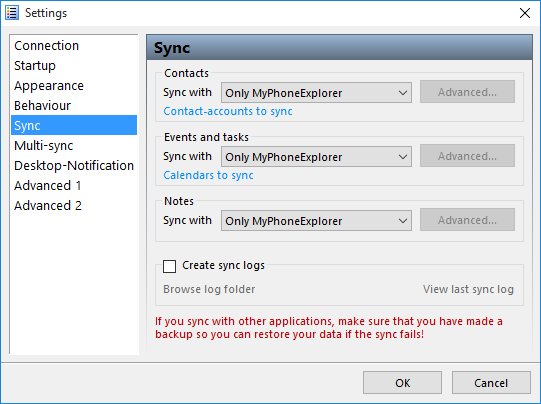
- When set to sync with Outlook, MyPhoneExplorer will sync data from Outlook to it's internal data store and then to the android phone. Changes coming from the phone will follow the reverse path. This will leave you with a copy of your data in your Outlook and a copy in MyPhoneExplorer.
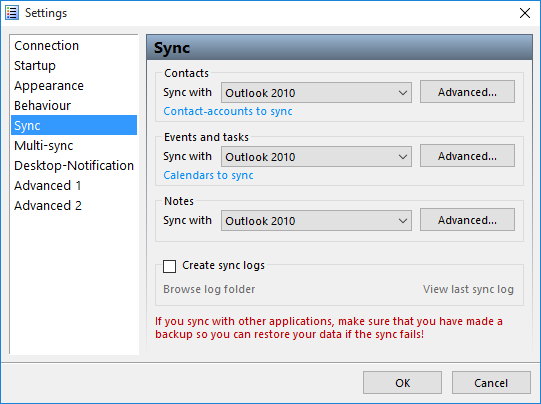
- The default settings will sync the data from the phone only with MyPhoneExplorer's internal datastore
- configure MyPhoneExplorer to prompt you when changes are discovered. This is only temporary whilst you check things works properly with the syncing. (File / Settings / Sync / Advanced )
- Select connection method
- Bluetooth
- pair the phone via bluetooth with your PC
- configure the connection method to be Bluetooth (File / Connection ) (see help file)
- Wifi
- USB
- Bluetooth
- set the windows app to run automatically (optional)
- set Multi-sync to run when a sync is run automatically (File / Settings / Mulit-Sync) (optional)
- Configure the Sync settings (File / Settings / Sync ) to point to Outlook.
- make sure all syncing works correctly
- Done
MyPhoneExplorer Notes
- You can decide in which contacts store (Phone only or Google Account) MyPhoneExplorer creates new contacts (this is set in the android app - settings / 'Add new contacts to')
- You can decide in which calendar store (Phone only or Google Account) MyPhoneExplorer creates new items (this is set in the android app - settings / 'Add new events to')
- MyPhoneExplorer by default reads the items out of both Local and Google Account for syncing with Outlooks (this is set in the android app - settings / 'Contact-accounts to sync')
- MyPhoneExplorer by default reads the items out of both Local and Google Account calendars for syncing with Outlooks (this is set in the android app - settings / 'Calendars to sync')
- Once you have everything setup how you like and you now it works well, set everything to automatic to make things easy
- It might be worth only having sync on only for 1 calendar and contacts store to keeps things simple
- If the item (calendar or contact) was created in the Google Account, then it will be deleted from the Google Account when deleted from Outlook. Basically this means that an item only exists in either the Google Account or the Local phone store and upon editing or deletion in Outlook this change is reflected in the item in its relevant store.
- when you hit the blue sync button at the top in the windows app, it will only sync the contents of that tab. ie if you are on contacts it will only sync contacts etc.... There is a multi-sync option that you can run from the menu that will sync all items.
- The items you see in the Windows Application are what you can see in your phone at the monent of syncing (need to 100% check this)
- I am not sure what would happen if you have the exact same contact in your Google Account as you do in your Phone's Local Store
- You can set the sync button to perform a multi sync by setting the following option and what features are synced with the Multi-sync (File / Settings / Mulit-Sync)
- Contact Profile images do not always sync with outlook. Not having the images on my phone or in out look is not a desperate thing. I could always use that go mod app
- How to use MyPhoneExplorer with an Android Device - FJ Software
- MyPhoneExplorer - YouTube - An overview and simple instructions.
Delete Local Contacts and move them all to your Google Account
You can delete all contacts on the phone in one go by using the windows application. This example deletes the phones local store, and then uploads all your outlook contacts to your Google Account. You can also do the same instructions for your Calendar. As ever just make sure you have backups of you Outlook PST and your Android Phone's Contacts and Calendar just incase you have some issues.
- Run a sync so you have the most upto date contacts in Outlook
- open the windows app
- make sure in the app you only have the contact stores synced that you want to delete contacts out of. ie. if you want to remove all the Phone's Local Store contacts only have that store enabled for syncning in the android app. If you have the Google Account selected aswell, those contacts could be deleted.
- connect the phone, wait for it to be found
- selecting all of the contacts and hit delete
- Click the 'run the sync' button Only
- The records should now be deleted out of the Phone's Local Store, so click 'Abort Sync'
- You can re-enable the Local Contact Stores again if you want
- make sure in the app, you have it set to create new contacts in your Google Account (settings / 'Add new contacts to')
- run the sync again, but select 'Force Outlook --> phone'
- All you local contacts are now removed and are present in your Google Account
NB: When you run the script again it might have a few records that need updating/syncing this might be because of slight inconsistencies with how the records were stored.
Syncing Profile Photos (Google -> Phone -> MyPhoneExplorer -> Outlook)
this feature is not perfect, but not absolutely required. The mechanisms in MyPhoneExplorer do exist but not always aas you expect. If you had no contacts in outlook and everyone of your google account contacts had a profile image they would all transfer to outlook withou issue. The problems come in when you have contacts in different locations.
- If you edit a Google contact on your phone, the contact image stored at Google will be synced to the phone and then outlook via your MyPhoneExplorer
- If you edit the contact at Google Contacts (webpage) this does not seem to push the contact image to your phone – not 100% verified
- If you edit a contact on outlook, this will not cause the google account contact image to be download to the contact on the phone and then to outlook via MyPhoneExplorer (could not get this to work)
-
Basically if you sync both directions you will probably not get the images updated as myphonexplorer does not use image change as a trigger point. You need to force Phone to outlook.
-
MyPhoneExplorer can only download the phone logs, you cannot push the losg back to the phone
-
There should be an app that syncs the profile images. This should allow only those contacts at Google's Servers that have a profile image to updated the local cached version of these Google Contacts on your phone.
GO Contact Sync Mod
GO Contact Sync Mod - at SourceForge.net
This is a very simple piece of software that allows you to sync your outlook Contacts and Calendar directely with your Google Account and then by proxy, with your Android Mobile Phone because that syncs with your account. You can sync your contacts and calendar even if you do not have an android mobile phone. This software can be set to run automatically and sync automatically.
Easy to use and Easy to run. If you do not want all of the extra features of MyPhoneExplorer and do not want to use the Phones Local Store this would be for you.
Notes
- When you first run this software it might prompt you what to do when it finds 2 matching contacts but this is straight forward and will only happen if you already have contacts in your Google Account.
- GO Contact Sync Mod links a contact (and calendar events i think) by some sort of relationship it creates. I do not know if you remove this program whether this link is destroyed. You can always replace all of your Google Account Contacts with your Outlook ones if you get in to difficuly assuming you already have them synced
- How to Automatically Sync Contacts Between Outlook and Gmail - This is a tutorial on how to use Go Contact Sync mod
Clear Phone Contacts Data
A common problem with Google Contacts is tha the profile images stored on Google's Servers do not always repliacte down to your android phone. These are a couple of methods to fix (sort of) the problem.
Method 1
- Find a contact that has a picture that is not synchronizing.
- Edit this contact
- This will cause Android to re-sync the contact with Google's servers.
Method 2
This option seems to be really popular on the internet and does seem to be successful boot has some caveats. This method will delete your recent call history, call logs and contact Favourites, possible more.... This method is taken from this article, Android: How to Delete All Contacts
- navigate to (settings / apps / ‘contacts storage’)
- Clear data
- re-sync your Google account via (settings / Accounts / Google)
Some images were updated, some might still be downloading when i checked. Favorites were missing and recently called people. It did not cause all contacts to be updated, some had to be merged/updated (my choice) when i re-synced with MyPhoneExplorer. One of the accounts that I merge updated its contact photo. You should make note that it was updated because I merged the account changes and did not use the outlook contact only, I could of also just used the phone account which probably would have a similiar effect because my accounts were mostly in-sync. If there were already images on the outlook account I assume it would not get replaced. This method did delete call logs from the phone, recent calls, missed calls etc..
This method does work a little but does not seem able to 100% download all of the images, this could possibly i have not left it long enough or there is a sync limit which has been reached so you have to wait for a reset.
This is a video of a smiliar method but it uses 'contacts' not 'contacts storage'. I tried this but could not get it to work. Android Contact List Images Photos Missing - YouTube
Other Contacts and Calendar Syncing Software
Below i am going to list a few pieces of software i have found for syncing outlook with your android phone. Some are free and some are paid for.
- GO Contact Sync Mod - this is a new kid on the block, a windows application that directly syncs outlook contacts/calendar/possibly notes to your Google account
- CompanionLink - Sync Outlook with Android Contacts, Calendar, Tasks, Notes, Journal, and Categories
- How To: Sync Android With Microsoft Outlook | PCMag.com - article
- SyncRoid - Outlook Sync Lite - Android Apps on Google Play
- SyncRoid - Outlook Sync - Android Apps on Google Play
- Outlook-Android Sync - Android Apps on Google Play
- MyPhoneExplorer Client - Android Apps on Google Play
- SyncRoid
- Sync Android/Droid with Outlook/Exchange - Forum and table showing loads of different software and their functions.
- SyncDroid: Sync Android to PC, free Android Backup, free Android Restore
Syncing Links
- How to Sync Google and Outlook Calendars - How-To - PC Advisor - Google recently pulled the plug on its Outlook calendar sync utility, so what is the alternative? Here are a few suggestions on how to sync your Google and Outlook calendars.
Syncing Email
IMAP
If you are using IMAP then there is a chance you have all your contacts and emails stored with your email provider, even your calendar if Google.
POP3
This is not strictly achievable when using POP3 but i have a really good work around.
- configure your pop settings in your outlook to leave emails in the mailbox for 14days
- install K9 email app on your android phone
- configure your email account as IMAP
what this does is allow your main PC to download the emails as it does normally but leaves 2 weeks worth of emails in the mailbox so your phone has upto 2 weeks to download these emails. But because the phone is setup as IMAP you get immediate emails via PUSH notifications. I think K9 caches the emails it downloads so it possibly is keeping emails for longer than 2 weeks, if it doesnt having 2 weeks worth of emails on your phone is more than enough.
If you find that your mailbox is getting too full you can either increase the size of the mailbox or reduce the number of days that outlook keeps emails in the mailbox.
The PC with outlook on will always be the master.
MS-Exchange
I have not tried this but i am sure there is full Microsoft Echange support available if you use one of these corporate systems in which case you email, contacts and calendar will be synced.
How to Fix the Automatic Repair / Boot Loop in Windows 8
This has got to be one of the most annoying issues with Windows 8, and also one of the most unfixed issues. Below i will show you what i did to fix my issues and then expand on what i think the causes are etc..
There is UEFI (EFI) and non-UEFI versions of boot loader. I think this is the difference between secure and non-secure booting.
What I did to fix the Boot Loop?
Listed in order.
Stage 1
When you get this issue it always loads the choice screen where you can try to load windows again or try to repair your Windows installation. This menu never gives you any indication of what the error is, it just keeps looping.

In this Repair menu i tried all of the following options, non of which worked to reapir the boot loop.
- Safe Mode - I followed the instructions to load safe mode and also the other restricted types of startup (accessed via the Advanced Tools)
- system restore - would not run because it could not find any system restore points
- chkdsk c: /r - this did not find any issues
- sfc /scannow - did not run
- bcdedit - options, add here copy, backup, rebuild - this could not find any windows installations and c:\boot did not exist
Stage 2
I now followed the instructions from this webpage with a few modifications because i relised that i was using a UEFI and that this might cause other issues. However the things i tried above are valid for Windows 8.
http://woshub.com/how-to-repair-uefi-bootloader-in-windows-8/
The matter is that the BCD loader configuration in Windows 8 installed in UEFI mode is stored on a separate hidden EFI volume (100 MB in size on FAT32 file system). Bcdedit can not see it and, therefore, manage the loader configuration on it.
NB: my bcdedit could see the BCD i think it was because the appropriate partition had a drive letter
My Modifications
- My partition with the EFI folder on was J: and already had the drive letter assigned
- My J: partition was 500mb
The commands i actually ran from the Windows 8 Boot Disk (DVD):
- cd /d j:\efi\microsoft\boot\ (/D : change the current DRIVE in addition to changing folder.)
- bcdboot C:\Windows /l en-us /s j: /f ALL
from here on i get the following error screen which actually shows you an error
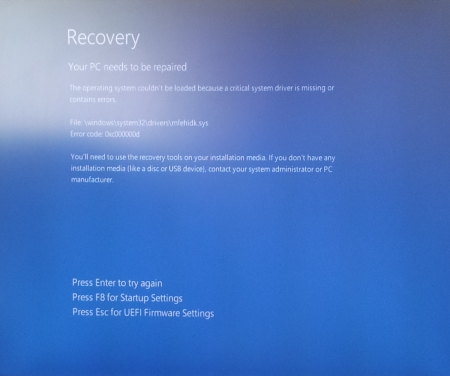
The operating system couldn’t be loaded because a critical system driver is missing or contains errors.
File: \windows\system32\drivers\mfehidk.sys
Error code: 0x000000d
The file mentioned above, Mfehidk.sys is a system process that runs in the computer background and maintains the host intrusion detection system for McAfee Antivirus. Mfehidk.sys will not be the cause of everyones boot loop or the faulting file shown.
http://h20565.www2.hp.com/hpsc/doc/public/display?sp4ts.oid=4132189&docId=mmr_kc-0110048&docLocale=en_US - says what Mfehidk.sys is for.
Stage 3
The boot loop has now gone but I could no longer use the 'Auto Repair Menu' on the hard disk so i had to revert to using a Windows 8 Boot Disk with Dart Utilities.
When the disk had loaded i navigated to the Advanced Tools via the Troubleshooting menu and ran the following (you will be prompted to login)
- Startup Repair - once this had completed it says it could not repair the startup and gave me the option of shutting down or reloading the utlities. One other piece of information it gave was the location to its Logfile.
C:\windows\System32\Logfiles\Srt\SrtTrail.txt
I rebooted the PC and Windows still did not load and went to the same blue screen with the error message on it. - SFC via Dart - This application ran and completed successfully but without finding any errors or corrupt files. Obviously windows did not load.
Logfile
So i decided i would go and have a look at this file and what the logfiles say. You can read the SRT log to see what issues are hyappening.
- boot of the windows DVD
- open the file explorer
- navigate to and open
C:\windows\System32\Logfiles\Srt\SrtTrail.txt
- read the log file and see if this tells you what is causing the startup error.
{insert my log file here} -
In my log file i was drawn to the lines
Root cause found:
---------------------------
Boot critical file c:\windows\system32\drivers\mfehidk.sys is corrupt.

Repair action: File repair
Result: Failed. Error code =  0x2
Time taken = 2781 ms

Repair action: System files integrity check and repair
Result: Failed. Error code =  0x490
Time taken = 870141 ms
- i then navigated to this file on the disk because i know that windows was now loading because it shows c:\windows\ as part of the file path and the logfile probably is right that this file is the cause.
- when i examined the file i found the file to be 0 Bytes and no wonder that windows see the file as corrupt. Because this file is not a windows system file this is why it is not fixed with SFC. There were also other similiarly named files that were most likely part of mcafee anti-virus.
- I created a temp folder and moved all the 0 Byte files into that folder.
- I now rebooted the computer
- Windows now loads, Fixed
Stage 4
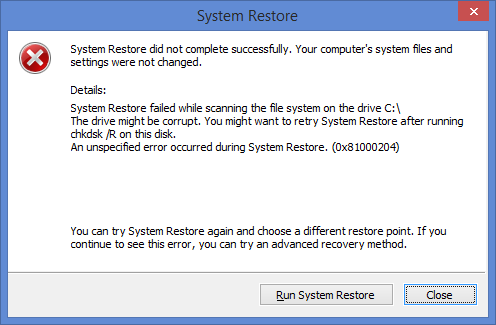
Just as a followup, when windows loaded it prompted me with a system restore error. This could of been caused by some of the work i did or that my client had been messing before the failure, even though he told me he had not. I just cancelled the notification and all was well.
Causes of the boot loop
The cause for this boot loop was undoubtably the 0 Byte files that windows was trying to load as drivers, and inparticular because it was a low level antivirus file, this was why the loop happened so quickly.
even though i tried loading windows without low level malwaredrivers i think this file was either not a low level antivirus file or when it is parsed because it is 0 Bytes long caused a hard crash of the kerenl which always flaggs the last boot as dirty, hence the loop.
The files could of been made 0 Bytes by anti-virus cleaning the file because it thinks it is a virus or perhaps when Mcaffe updated itself it did not correctely delete these files.
What should you do?
above was a worked example of what i did to fix the boot loop but here is the order of things you should do. Try rebooting your PC after each section to see if that fixed your computer.
- boot of a windows DVD and examine the log file to see if you can fix any identified issues
C:\windows\System32\Logfiles\Srt\SrtTrail.txt
- check the following folder for 0 Byte size files and remove them.
C:\windows\System32\drivers\
- Run the 'Startup Repair' tool from the windows boot disk
- Run system restore from either the windows boot disk or the onboard 'Automatic repair menu'
- Check the harddrive for issues
- chkdsk c: /r
- SMART
- full surface scan
- Try all the fixes bcdedit from
- Try the EFI repairs from - How to repair UEFI Bootloader in Windows 8 | Windows OS Hub
You should have a working PC by now, if not try going through them again to see if you have missed anything. After this the next step is to back all your stuff up and perfomr a refresh, reset or fresh install of windows.
Links
- How to repair UEFI Bootloader in Windows 8 | Windows OS Hub - I used this article as the basis for my succsessful repair
- HP Support document - HP Support Center - this article tells you what Mfehidk.sys does
- How to Fix the Automatic Repair Loop in Windows 8.1 - Microsoft Community - This is the goto article from Microsoft. You should read all of the thread.
- Automatic Repair Loop on Windows 8.1 - Microsoft Community - Tells you what bootrec commands to run
- How to repair the EFI Bootloader in Windows 8 - fixedByVonnie - a good article on how to fix this issue with pictures
- Fixing a Corrupted UEFI Partition in Windows 8 or 8.1 - A short article with the bootrec commands to run
- Total identified Windows installations: 0 - Microsoft Community - might have relevance when yoou read it